Local orchestration for a fleet of coding agents.
On your Mac, on the network you already sit on. I built Sideboard because one agent per worktree is solved — what's missing is the tier above it: an agent that can reason about the other threads, a board where I can see them, and Slack so a coworker can step in. Without moving the repo into someone else's cloud.
npm i -g @sideboard-ai/cli
Auto-updating · the CLI and MCP run without the app.
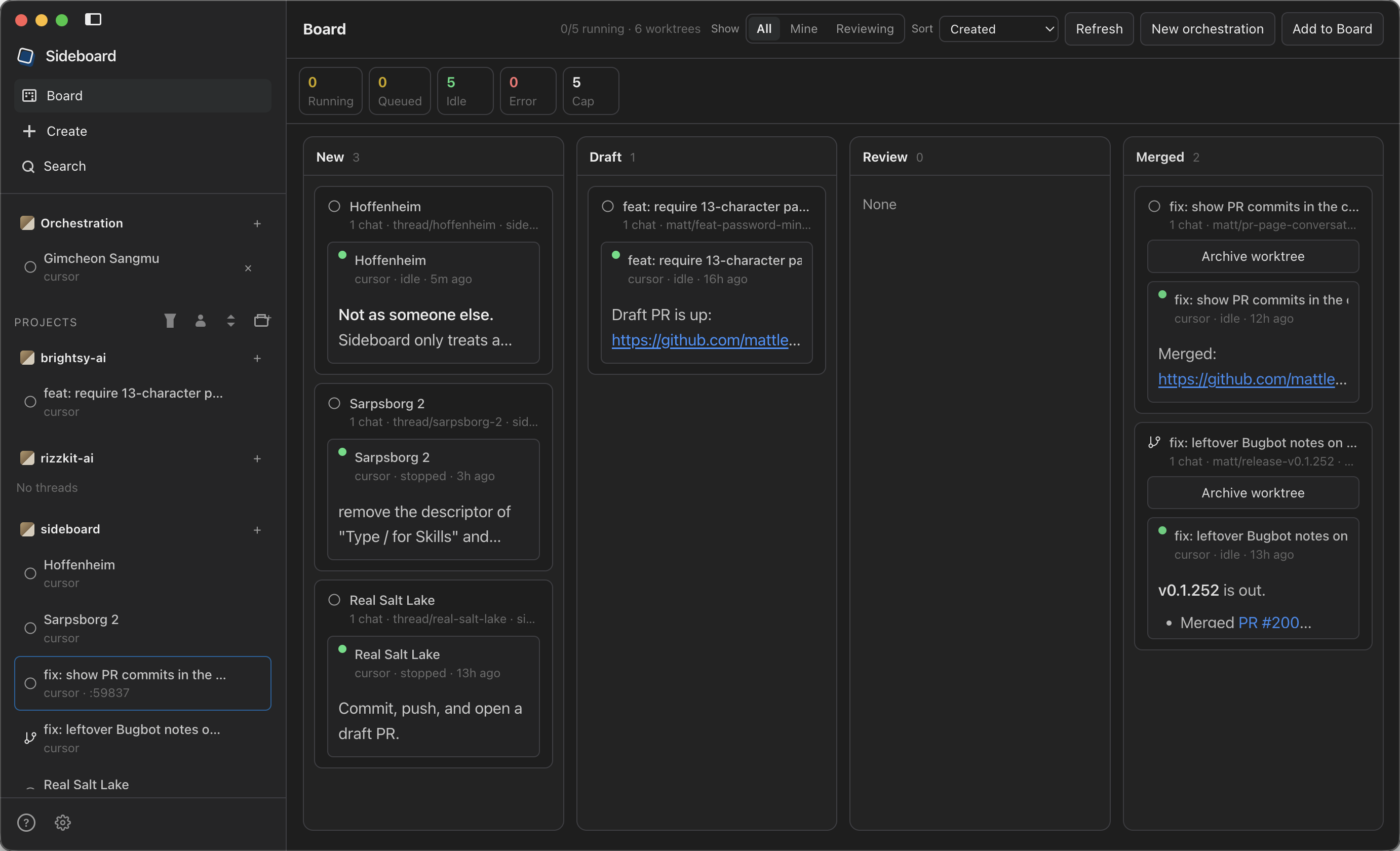
The global board: every worktree as a card — New, Draft, Review, Merged — with live status in the sidebar.
Three things, all on this machine
A global board for you
Status, live output and fan-out across every thread. One agent per thread/* worktree, all of them in one view instead of eight terminal tabs.
An MCP for the agents
List threads, wait on turns, read diffs, fork worktrees, schedule jobs that wake an orchestrator — and open panes in the desktop. The orchestrator is an agent too, and it can see the whole fleet.
Slack to this Mac
DM or @mention the orchestrator from anywhere. It can ping a coworker to review a PR a worktree just pushed; their reply comes back as information, not a command, and the orchestrator continues.
Contextually aware
Tell Sideboard once — account and project context — and the orchestrator picks tickets and review PRs with that text every time you ask. Agents can update it after you confirm.
Settings → Agents
Account context is freeform: roles, how to find your tickets and review PRs — team, labels, assignee rules.
Settings → Projects
Per-repo context that adds to the account. One repo can be “design review only.” Agents update either field after you confirm.
Ask the orchestrator
Find me some work lists matching tickets (list_issues) and review PRs (list_prs queue=review). Find me work and start it lists, then creates the worktrees and starts the chats.
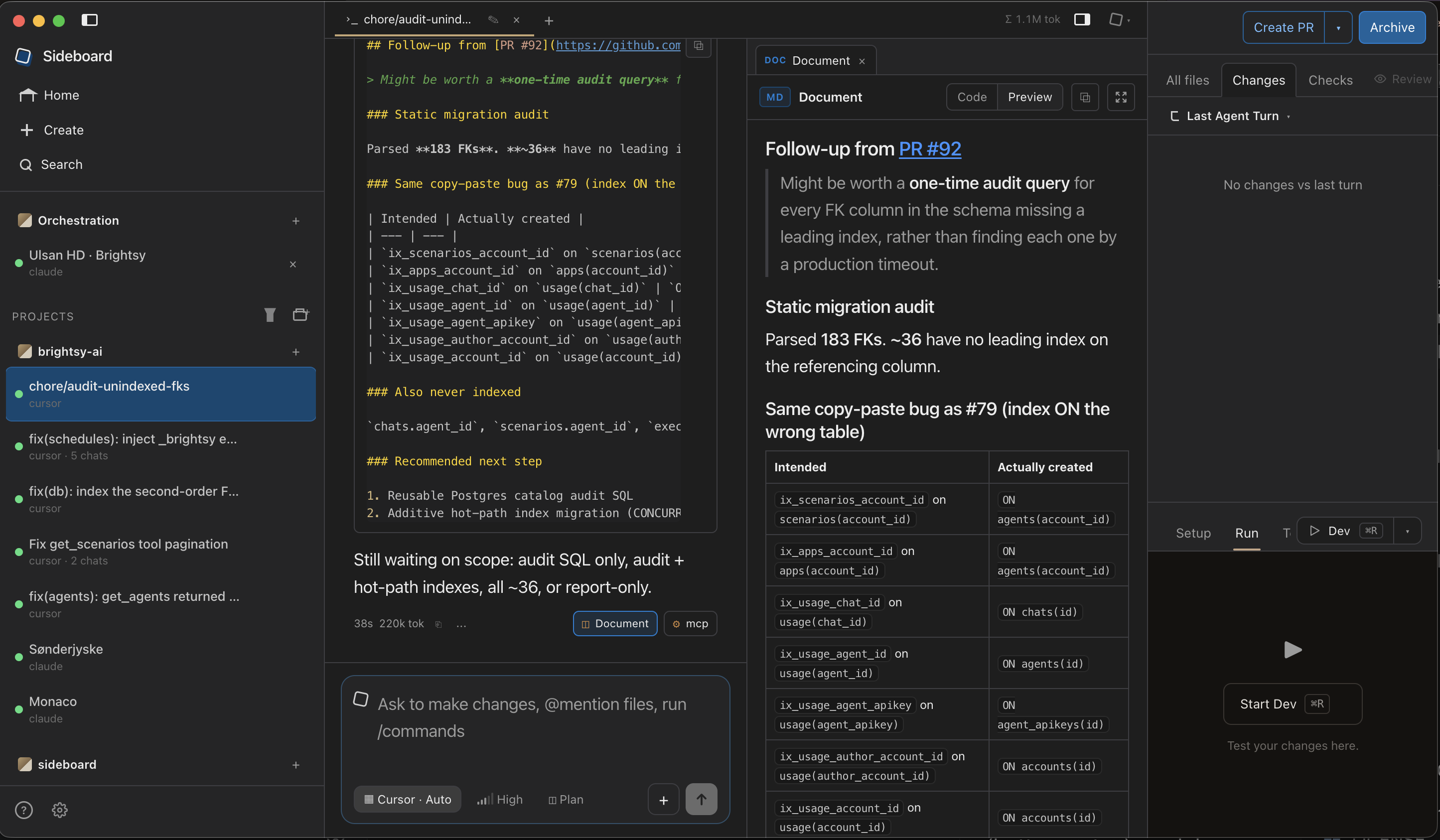
One worktree chat: the agent thread in the middle, artifacts and schema tabs beside it, the git repo on the far right.
Why it exists
Spawning worktrees is the shared primitive. Conductor put the fleet-orchestration tier in a paid cloud. Sideboard puts that tier on the Mac I already use, on the VPN it is already on.
Mechanical control — list, send, diff, land — stays on the CLI and costs zero tokens. MCP is for when an agent needs judgment across threads.
Peer-by-peer compare| Job | Typical tools | Sideboard |
|---|---|---|
| Orchestrate the fleet, agent-visible | Human board, or a cloud API | MCP + global board, on this Mac |
| Stay on the corporate VPN | Cloud sandboxes leave it | Agents run as you, on this network |
| Coworker in the loop | Product cloud or shared sandbox | Slack review ping, reply comes back |
| Keep going when you step away | Cloud sandbox keeps running | Slack to this Mac — opt-in caffeinate |
| Run work on a schedule | Cloud cron / always-on sandbox | Local jobs; opt-in caffeinate so they can fire |
| Drop into the native CLI mid-session | Weak, or one-way | attach keeps the same session |
| Recurring process guides | Locked in the product, or chat memory | Committed .claude/skills — Claude Code and attach load them |
| Bring existing worktrees in | Stuck, or start over | adopt + Conductor import |
| Work on main in the project folder | Always a sidecar worktree, or no rail | Opt-in cowboy (off by default) |
| Data the agent invents | Spreadsheet, CMS, or markdown forever | Schema → form, beside the diff |
Code in the worktree, data right next to it
Agents write code and they invent data shapes — content, configs, feedback, ops rows. A worktree chat is repo, worktree and structured data in one view, without bolting on a CMS.
Chat
The worktree agent driving that branch — Claude Code, Codex, OpenCode or Cursor. Nested Task / Agent work streams in a card under the parent tool.
Structure column
Artifacts, a JSON Schema rendered as table or form, and a file manager. Tabs stick per chat until you close them.
Repo, far right
Files, Changes, CI and Review, plus Setup, Run and Terminal for the connected worktree.
The loop
Board, send, inspect, attach when I want the native CLI, land when it's ready. Landing on the default branch is blocked (unless you opt into cowboy mode), dirty worktrees need an explicit confirm, and there is no --yes on land.
sideboard detect
sideboard new --from branch:main --agent claude
sideboard send <thread> "add a README note"
sideboard diff <thread>
sideboard attach <thread>
sideboard land <thread>
Agents are plugs
Not the product. Install the CLIs you want on your PATH and sideboard detect reports what it can see. Cursor runs through a user-installed official SDK (npm i -g @cursor/sdk).
Register the MCP with any of them — claude mcp add --scope user sideboard -- sideboard mcp — and that agent can see the fleet from outside Sideboard too.
It fits if…
You already run several local CLI agents on a Mac — especially one on a corporate VPN — and you want an orchestrator you can see, an agent can drive, and Slack can reach. Extra fit when the agent produces structured content or HTML that should sit next to the diff.
Use something else if…
You want a polished local board and will never touch CLI or MCP (Conductor free), you want their paid cloud workspaces that keep running after the laptop closes, you live in an IDE-native agents window, or you're on Windows or Linux.